Tips & Tricks
Make the most of Fontics and deliver value even faster.
Guardrails
A few habits that keep your model safe while Fontics runs.
Work on a copy
Save a copy of your model before running simulations, so you can roll back easily if needed.
Let modules finish
Don't interrupt a module while it runs. When it finishes, Fontics restores every input to its original value.
If a run is interrupted
If you stop a run or Excel crashes, trace the cell references of the Fontics inputs and reset each one to its original value.
Formatting
Format your cells once and Fontics carries that formatting into every output.
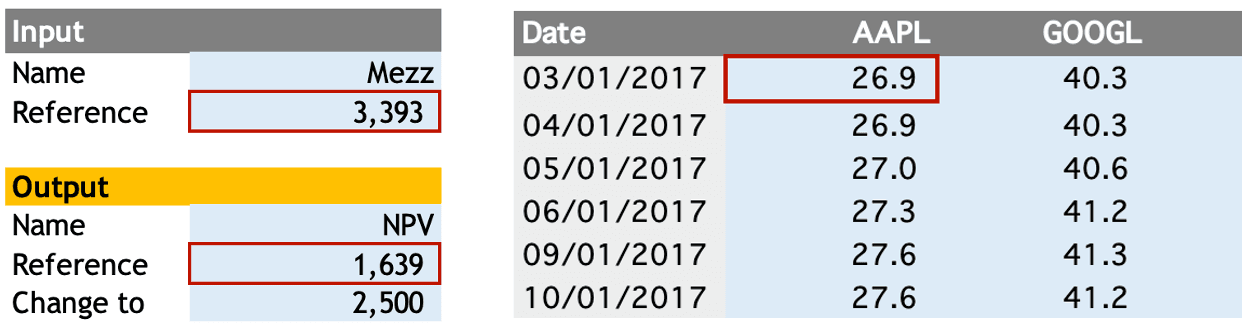
What gets formatted
Output data and chart axes: decimal places, thousand and decimal separators, and percentages.
How it works
Fontics follows the number format of your input and output cells, so format them before you run the module.
Single inputs
Fontics uses the number format of the Reference cell (left in the picture).
Group inputs
Fontics uses the number format of the top-left data cell (right in the picture).
Optimize
Make your simulations run faster.
Circular references
Supported, but they slow simulations down by 5 to 10x. Make sure iterative calculation is turned on in your calculation settings.
Data tables
If your model already has data tables, set calculation to "Automatic except for data tables" to speed things up.
Free up memory
Fontics runs 5+ scenarios per second, and 10+ when you close memory-heavy apps such as browsers with many tabs.
Dynamic arrays and spill ranges
Supported: Output cells in Impact Analysis modules, and any cell in all other modules.
Not supported: Input cells in Impact Analysis modules.
Linked workbooks
Supported: Links inside your formulas, and inputs in all other modules (Series Analysis, Monte Carlo, Charts).
Not supported: Inputs or outputs in Impact Analysis modules. Trace also skips cells in linked workbooks.
Accelerate
Shortcuts that speed up your workflow.
Duplicate modules
When analyses share the same inputs, duplicate the module and just change the output. For example, Scenario or Sensitivity Analysis on NPV and IRR.
Rename freely
Fontics sheets are named Module_A1a by default. Rename them to keep your workbook organized.
Where new sheets go
Fontics adds new sheets to the right of the active sheet.