For investment, credit & valuation teams
Hours of Excel analysis, done in minutes. AI-free.
Run scenarios, sensitivities and stress tests in seconds, and review models in minutes.
Results you can defend.
Fast
An analyst's day of work, done in an hour with Fontics.
Deterministic
No AI. No black box. Calculations you can trace back to every cell.
Convenient
Before and after, side by side in one chart with data to back it up.
Portable
Work in Excel or Google Sheets, and share results with anyone.
20+ modules, four workflows
Make every model IC-ready.
Stress-test the deal
Find where the deal breaks before IC asks.
Find what drives value
Know the few inputs that actually matter.
Audit the model
Catch errors proactively, including in models built with AI.
Diligence the financials
Sense-check 10 years of monthly financials in seconds.
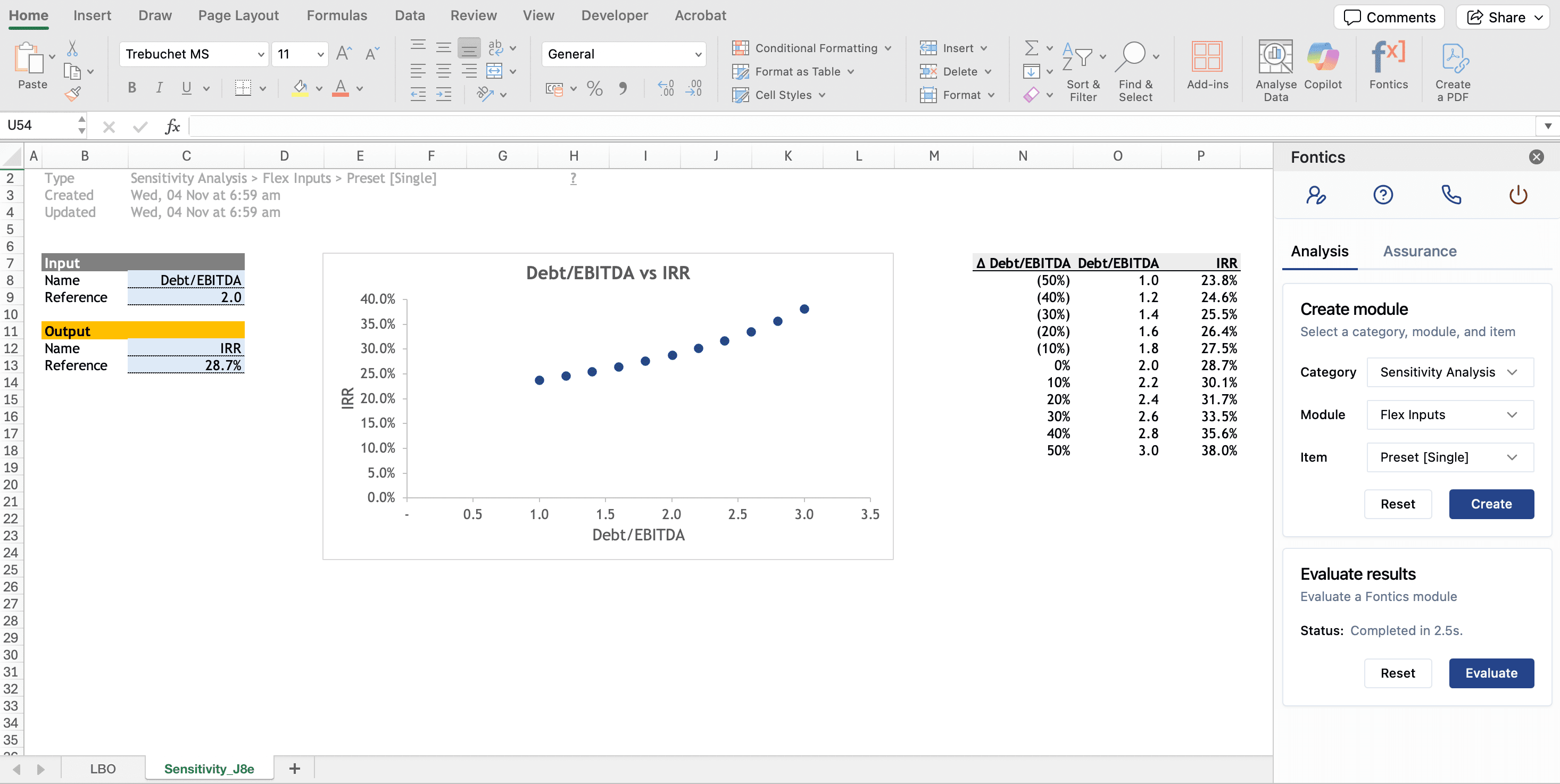
Every result, charted.
See what changed, and why.
for a one-way sensitivity, on any model.
No manual flexing. No manual charting. The sensitivity plot builds itself.
Same inputs. Same answer. Every time.
“The model guessed” won't hold up in front of an IC or a lender. Fontics runs plain, repeatable math on your own formulas, so every output traces back to a cell in your model.
Reproducible
Re-run any analysis and get the same results. No prompts, no hallucinations.
Traceable
Every result flows from your model's own formulas, and charts are native and fully editable.
Your model, untouched
Analysis runs in new sheets. Your original model is left intact.
Data stays put
Standard modules run 100% locally. Only Monte Carlo sampling runs in the cloud.
Already using Claude, @RISK or OAK?
Use the best tool for each job.
Fontics doesn't build models. It analyzes and reviews them, AI-free, and works alongside the tools you already use - in Excel (on Windows & Mac) and Google Sheets.
- Use Claude or other AI if you need to build, extend or explain a model, or draft the memo around it.
- Use Fontics to review the model in minutes and run scenarios and sensitivities in seconds. Same answer, every run.
Analysis add-ins
- Use @RISK or Crystal Ball if you specialize in risk: fitted distributions, time series, optimization under uncertainty in Excel.
- Use Fontics to get scenarios, sensitivities, solvers and Monte Carlo in one add-in, for a fraction of the cost, on any platform.
- Use OAK or Arixcel if you run formal model audits: comparing versions, reconstructing formulas, checking standards in Excel.
- Use Fontics to review your model, then run scenarios, sensitivities and stress tests on it, in one add-in on any platform.
Running in your workbook in under two minutes.
Install the add-in
Follow the 30-second install guide for Excel or Google Sheets. One plan covers both.
Select inputs and output
Click the cells to flex (growth, WACC) and the result you care about (IRR, DSCR, valuation).
Get the chart, table or audit
Results land in new sheets with all charts and output data, ready for the IC memo or credit paper.
Re-run as the model changes
Change an assumption and re-run in seconds. Anyone with Fontics can re-run it too.
Trusted by deal and portfolio teams
“The multi-input solver identified an error on a live deal.”
“I can run live stress tests during investment committee meetings.”
“The scenario module will save days every quarter in my portfolio reviews.”
Built for your desk
Don't use Fontics if…
You work in FP&A.
Fontics is built for investment, credit and valuation professionals.
You think AI can do it all.
Leading AI for Excel tools score ~85% on real-world tasks. Fontics is AI-free.
You need a model builder.
Fontics doesn't build models. It reviews and analyzes them.
You trust every formula.
Fontics runs formula audits and deep traces in minutes.
You barely use Excel.
Under 2 hours a week in Excel? Saving 50%+ of that won't move the needle.
You only use Google Sheets.
You're in good company. Every Fontics module works in Sheets.
Start free.
Upgrade as your models grow.
Core is free forever. Every plan works in Excel and Google Sheets, and annual billing gets you two months free.
What analysts ask before installing
Does Fontics change my model?
No. Analysis runs in new sheets and your original model is left intact. Fontics changes the input drivers you select, recalculates the model and records the results, so you can review every output.
Does my workbook data leave my computer?
Standard modules run 100% locally, inside your model. Only Monte Carlo distribution sampling runs in the cloud; every other calculation stays in your workbook.
Will it work on Mac and Google Sheets?
Yes. Fontics installs in about 30 seconds in Excel on Windows and Mac, and in Google Sheets. Every plan works in both.
Can my IT team approve it?
Fontics is a Microsoft Partner and installs through the official Microsoft AppSource and Google Workspace Marketplace listings. For firm-wide deployment, SSO and admin controls, talk to us about the Enterprise plan.
Why is Fontics AI-free?
Generative AI sometimes hallucinates. With zero tolerance for errors in critical financial analysis, 100% of Fontics calculations are deterministic: fully verifiable and reproducible. Fontics works alongside Claude and other AI-for-Excel tools, and helps you validate AI-generated models in minutes.
Run your first sensitivity before lunch.
Excel and Google Sheets