Pareto Drivers
Run Pareto analysis to rank the weights of output drivers [using a solver].
Input Parameters/Data
Input Variable(s): Input driver(s) of the model. For each item, add Name and Reference (cell reference of its value).
Output Variable: Output of interest (e.g. Valuation, Profit, NPV, IRR etc.). Add Name and Reference.
Output Settings - Direction: Select direction of change - Increase or Decrease.
Output Settings - Change By: Select % change in output variable.
Output Settings - Scenarios: Toggle to run scenario analysis for each input variable.
Notes
Input Cell references can be any cell in Excel (i.e. including cells with formulas).
The analysis uses the proprietary Fontics solver to mirror the approach applied by experienced investment professionals.
Output
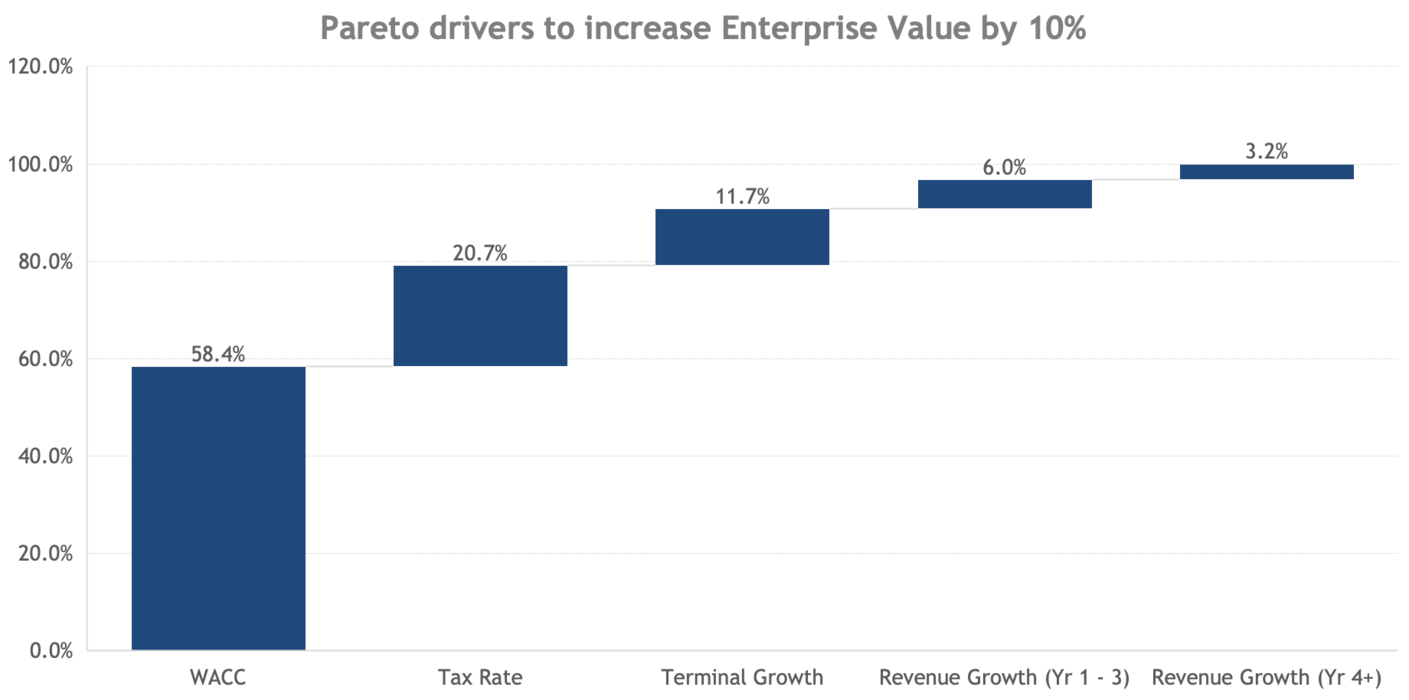
Excel Chart: Waterfall chart of the Pareto analysis which sums the weights of output drivers to 100%.
Individual Scenario Outputs: Output charts of the individual scenario analysis for each input variable.
Data: Output data used for the chart(s).